The right details
Keep the buyer, supplier, delivery address, PO number and agreed terms together. Add a needed-by date and a contact for receiving.
From the first item to the final total.
Put your next supplier order in one clear, editable document.
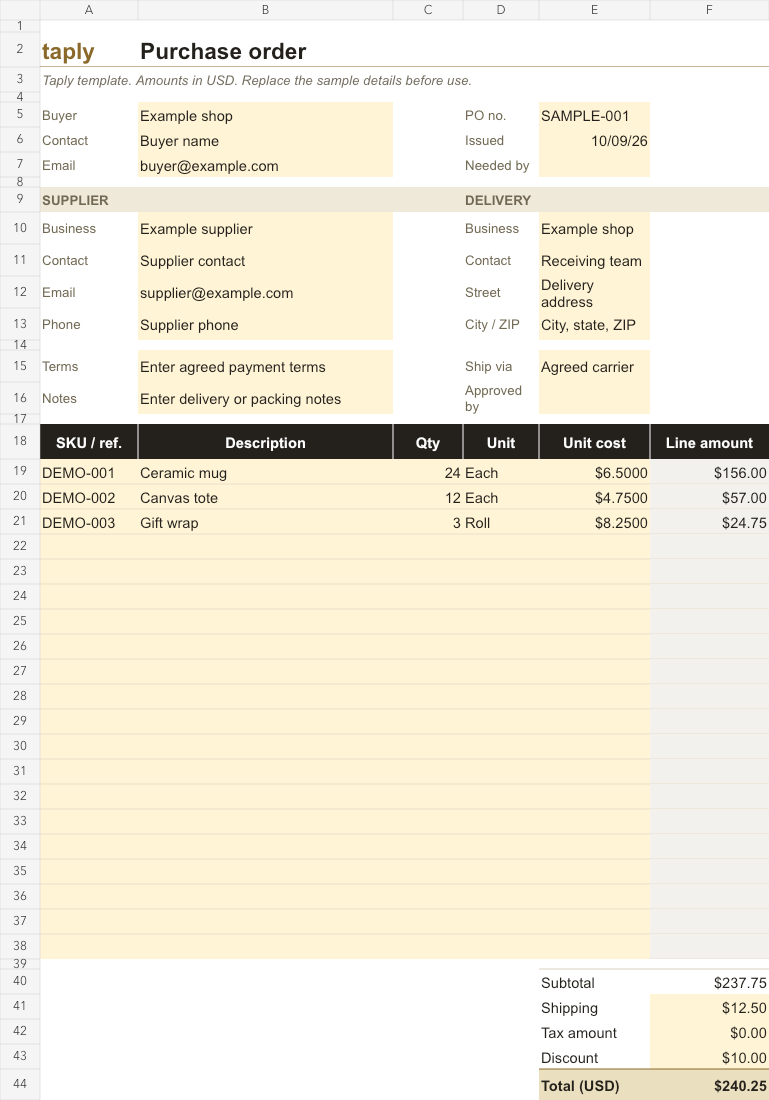
Bring item quantities, delivery details and agreed costs together before you share an order with your supplier. Make a copy, fill in the amber cells and review the calculated amounts.
INSIDE THE TEMPLATE
Give your supplier a clear view of what you need, where it goes and the costs you’ve agreed.
Keep the buyer, supplier, delivery address, PO number and agreed terms together. Add a needed-by date and a contact for receiving.
Use 20 prepared lines for descriptions, quantities, units and costs. Add your own item codes and see each line amount calculate.
Line amounts round to cents before the subtotal is added. Enter shipping, tax and discount amounts to complete the total in USD.
Open the .xlsx file in your spreadsheet app. Replace the fictional sample entries and keep an untouched copy for your next order.
Enter your PO number, dates, contacts and agreed terms. Use the notes field for delivery or packing instructions.
Enter a description, positive quantity, unit and nonnegative unit cost for each item. Fill in shipping, tax and discount as amounts; use zero when a charge doesn’t apply. Resolve any “Check” messages before using the total.
Check quantities and costs against your supplier agreement. To print or export the form, select cells A1:F46 and fit the selection to one page wide in your spreadsheet app. Review its page breaks and margins first.
This is a manual template with 20 prepared item rows. It does not send orders or sync with your POS. Tax is an amount you enter; the workbook does not determine the applicable tax rate.
Track opening stock, completed purchases and sales in three connected sheets.
Explore the templateCreate printable barcode labels from your product codes.
Explore the toolGive your next store promotion a fresh starting point.
Explore the templatesShowing 3 of 3 more resources for your store